Is Notion Really That Good? Notion : Review!
Source- Notion
Notion, it’s everywhere. Almost everyone these days use Notion. You might or might’ve not heard of notion. Notion is one of it’s kind, it is most probably one of the best Note taking application and here’s why…
What exactly is Notion
Notion is a note taking app. The thing that makes Notion so awesome is the fact that you can customize it till your heart’s content. Everyone’s Notion would be different. You can create your own template and you can share it with others, you can also collaborate and work as a team in Notion. I personally use Notion to plan and write these articles, I sometimes use it to take notes. Notion is a subscription based software.
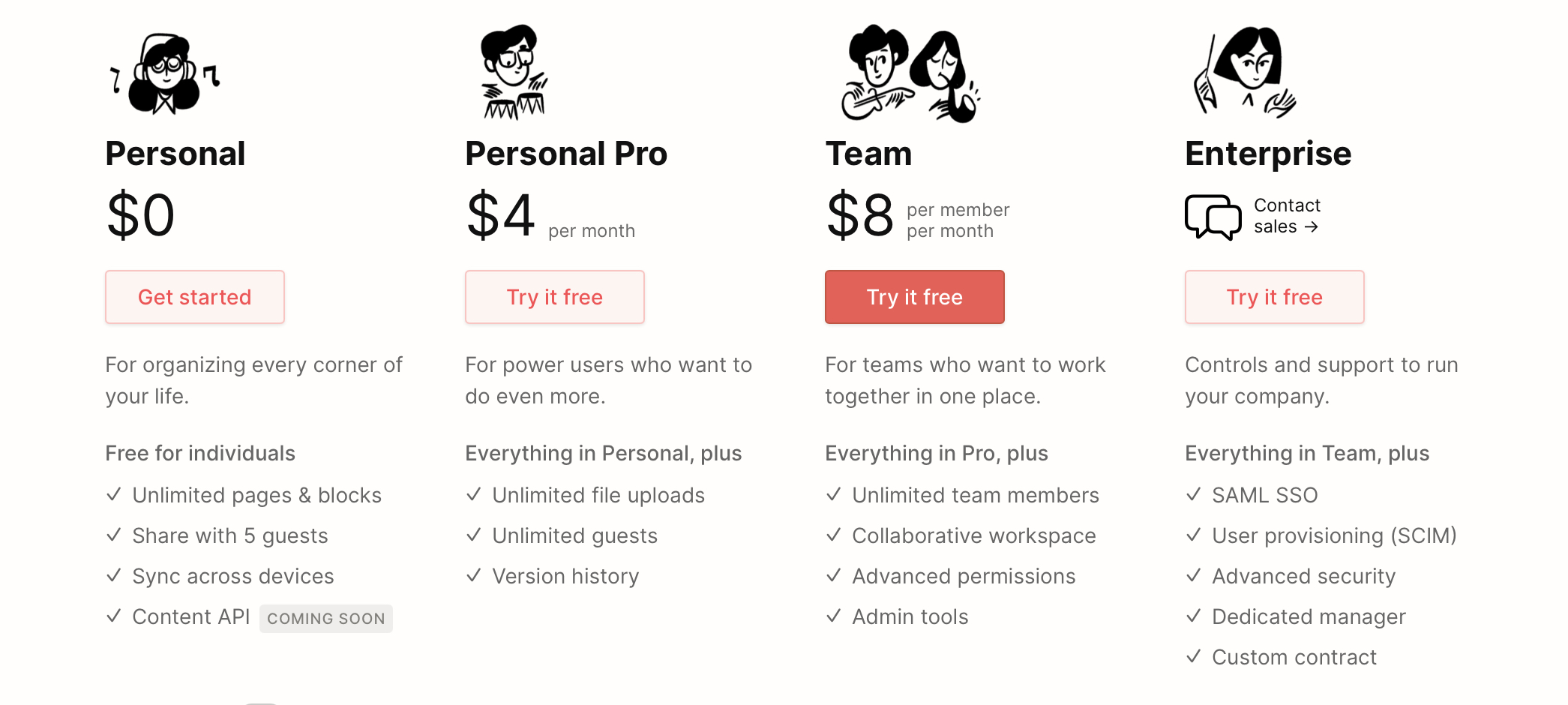
The Pricing is as follows-
Source- Notion
They also provide the personal pro plan for free if you are a student.
How I got into Notion ?
I got introduced to Notion by Ali Abdaal in one of his videos. From then on I was looking for a good Notion Tutorial, which sadly I couldn’t find. One day I saw a course by Francesco on Skillshare and I must say, that was most probably the best course I’ve ever had about Notion. Now that I know Notion I started tinkering around with it and to my surprise, it worked like a charm for me. I was much more productive. I must admit the fact that it took me a little bit of time to set things up but now everything works smoothly.
My Review
First off, I love Notion so this review might be a bit biased.
Notion is simple, it’s actually a mark down editor cum note taker cum whatever you want it to be. Notion offers the same features you’ll get with a markdown editor, but with more advanced features. It is used to create big and huge databases and to take notes. Notion is awesome because it lets you create what ever you want, how ever you want it to look like. I can even create my website inside of Notion.
It was a bit difficult for me to get my hands around Notion at first, but after watching that Skillshare class, it was a piece of cake for me. Something I love about Notion is it’s export options, you can export your notion page as markdown, HTML and PDF. As of now my experience with notion has been phenomenal. The only problem I am facing is in copying and pasting from and to notion, when I try to copy a paragraph with a heading, it just doesn’t work which sometimes is quite frustrating. Copying and pasting is the only thing I hate in Notion, otherwise I would say that Notion is simply the best app ever made (at least for me).
BONUS My Notion Setup
If you are just starting out on Notion a tip I would give you is to actually use emojis and icons a lot (if you can’t find an emoji for that particular topic you can always import any transparent png file and then it’ll look like an emoji) even if you hate emojis (just like me), trust me it’ll make you more efficient in using Notion, if you don’t, then it’ll look like a normal and boring text editor.
I have a very big Notion setup in which there is only a single page that I constantly use named ‘Blog’. Inside of ‘Blog ’ there is a table with 4 rows tiltled- Articles , Tags , Done (Checkbox) , Uploaded (Checkbox) . When I click on add a new section it creates a page and then I fill up the heading, tags and the date, then I continue as a normal page and start writing the content. Another thing I made was a calendar view, which makes things even easier. Overall I have a very minimalistic and easy setup since I didn’t want to overly complicate it.
Thanks for reading, Stay Home Stay Safe 👋🏻
-Rajat KR